A recent security news item has brought attention to a variation of a well-known web attack technique called clickjacking. This is not a zero-day vulnerability but we still do take it very seriously and want to clarify what it means for LastPass users, how we currently safeguard autofill, which protections are already in place, and what we’re doing to further protect your data.
What Is Clickjacking?
Clickjacking is a malicious attack tactic in which threat actors attempt to trick an end user (or their password manager) into entering information into a website form they control. This can be accomplished this in several ways.
- A cybercriminal could leverage a vulnerability within a legitimate website to compromise the site and inject a malicious hidden form that delivers the sensitive information directly to the criminals.
- Or, in a more serious scenario, they could compromise a victim’s computer directly with malware that can ‘inject’ a malicious hidden form when the victim is trying to visit a legitimate site, again using that form to steal the sensitive information.
Clickjacking attacks generally require the exploitation of vulnerabilities either on a targeted legitimate website or the introduction of malware onto the victim’s computer. These scenarios are not uncommon and can be used to trigger a password manager’s autofill on a hidden field within a malicious website or form.
Since the technique is intended to take advantage of a convenience nearly all password managers are designed to provide, LastPass is not uniquely vulnerable.
And while clickjacking can put passwords at risk on a site, any other passwords within your vault remain protected even when one password may have been exposed.
How Autofill Works Today
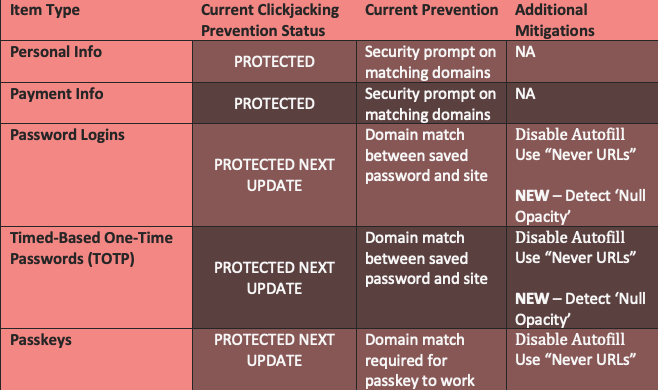
LastPass autofill is designed to enhance convenience while maximizing security. Today, autofill comes with several security measures already in place; for instance, by default we show a confirmation prompt for you to confirm before autofilling personal information (like addresses or credit cards) because it’s a less-frequent activity. For passwords, because this is a more frequent activity, we have background security rules in place, such as not autofilling if the website domain name does not match your saved one. Additionally end user options already exist for additional security when password filling (see below).
What Else We’re Doing About It
We take this and all threats very seriously. We listen to our customer feedback and are actively monitoring all discussions on this topic and are making additional updates to protect your security. A new background security rule is in flight and will be included in an upcoming browser extension release that is expected in the next version 4.146.6. This enhancement detects the most common clickjacking tactic which employs highjack elements hidden with ‘0 opacity’ and will block autofilling when detected on a website. Note, not all variants of clickjacking attacks rely on opacity, so we’re continuing to evaluate broader protections as well.
What Information Could Be Compromised Via Clickjacking?
Below is a summary of existing and planned mitigations.
What About Passkeys and Clickjacking?
Passkeys are, by design, more secure than passwords and are generally not susceptible. Unlike passwords, the ‘private key’ in your vault only signs an authentication request and remains safely in your vault, plus they can only be used for the specific domain on which they were created, not an illegitimate form or site.
** It is also theoretically possible for a legitimate website to have been compromised by an attacker who has injected code into that site. If this occurs a user may use a passkey legitimately, but the attacker ‘piggybacks’ on the session to view your account. The passkey itself is not compromised, but account data may be.
What You Can Do
In the meantime, you are protected if your vault is locked when not in use. Clickjacking requires the extension to be unlocked and active on a non-login page.
Most importantly, always exercise caution when visiting any website. Malicious or compromised webpage are built to accelerate your engagement with them and put key credentials at risk.
We also recommend the following options:
- Turn off autofill for all sites if you want maximum control. You can choose to disable it for all sites or select sites.
- Use “Never URLs” for your most sensitive sites. This prevents LastPass from offering to fill credentials on those domains.
(Note that disabling autofill entirely may reduce convenience and increase the risk of weak password reuse or phishing. Autofill only works on exact domain matches, which helps protect against spoofed sites.)
** Please make sure you enable automatic updates to receive the upcoming security enhancements by LastPass.
*** To learn mor about 'Never URLs' and disabling autofill for specific sites, please reference this support guide.









