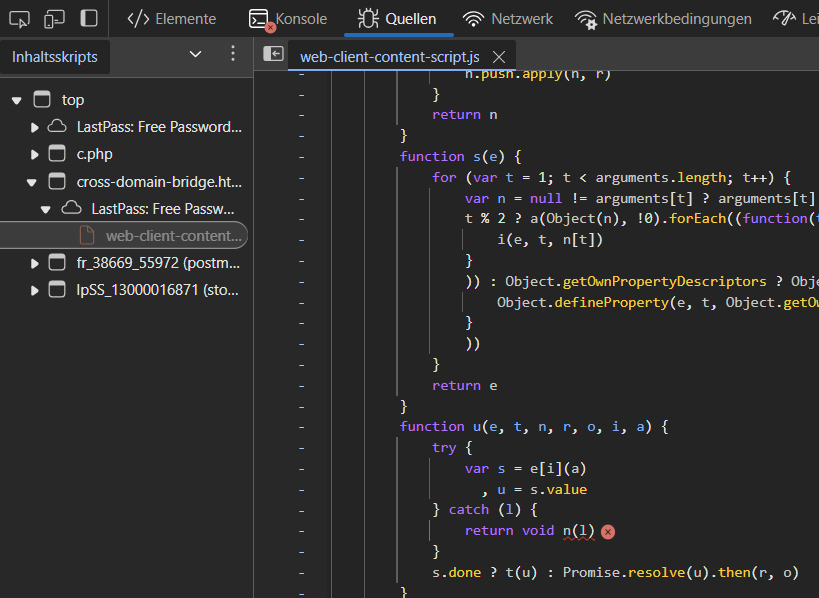
When I disable the Lastpass chrome extension, problem goes away - just started about a week ago...
Thank you for testing the new version. https://lastpass.com/misc_download2.php
We continue to look further into the permanent resolution.
Also, I have uninstalled the extension and re-installed it - problem remains.
Hi @deepak
Specifically which version of Chrome are you running with LastPass there?
Also seeing this on Chrome Version 132.0.6834.84 (Official Build) (arm64)
I have the same issue, both before the current version and after restarting to apply the next version, which is 131.0.6778.265, then again while looking that up to apply the latest update which is 132.0.6834.84.
This happens on the minified/obfuscated JS named web-client-content-script.js, the portion that appears looks like this, on the line in the error handler:
function u(e, t, n, r, o, i, a) {
try {
var s = e[i](a)
, u = s.value
} catch (l) {
return void n(l)
}
s.done ? t(u) : Promise.resolve(u).then(r, o)
I also have Uncaught TypeError: Failed to execute 'observe' on 'MutationObserver': parameter 1 is not of type 'Node'. This from the same file, in the portion that looks like this, on the r.observe(n, lo):
function fo(e) {
return new Promise((function(t) {
null === e || void 0 === e || e.addEventListener("load", (function() {
var n = e.contentDocument
, r = new MutationObserver((function() {
"complete" === n.readyState && (r.disconnect(),
t(n))
));
r.observe(n, lo)
))
The spacing was eaten up, as I thought it might. Here's a file with the spacing attached with both sections. I also missed that I get a third error: Uncaught TypeError: Cannot use 'in' operator to search for 'animation' in undefined. The attachment also has where this comes from.
Seeing this as well on Chrome Version 131.0.6778.266 (Official Build) (arm64)
I am getting the same issue, Chrome Version 132.0.6834.84 (Official Build) (64-bit). The error appears in the console on every page load, which is a little irritating when developing.
Please confirm the LastPass app version installed, as well as the affected applications. This will help us investigate further.
Thank you.
I have LastPass version 4.138.3.
Hi, everyone.
Thanks for bringing this to our attention.
It is a normal and harmless warning related to how the browser handles temporary storage in specific scenarios. It doesn’t affect the functionality of the extension or pose any security risk to you.
This happens because thechrome.storage.sessionfeature is only accessible in specific contexts, and the browser is simply letting developers know that it can't be used in certain places.
We are looking into why this is being triggered specifically. Thanks for your patience.
Same issue here. Chrome Version 132.0.6834.84.
Same issue here
Thank you, it's not harmless however, it's prevents websites from functioning properly, specifically angular websites. I have to disable the lastpass extension so the site loads properly.
Same issue here. Using Chrome 131.0.6778.265 (Official Build) (x86_64) and LP 4.138.3
Error is: "Uncaught (in promise) Error: Access to storage is not allowed from this context."
coming from web-client-content-sceipt.js ("return void n(l)" inside a catch block)
I have not faced any roadblocks due to this console message so far. I just thought this was odd as the message wasn't there a couple of weeks ago.
I have LP extension version 4.138.3
Same issue.
Chrome Version 131.0.6778.265 (Official Build) (arm64)
Chrome extension: LastPass: Free Password Manager 4.138.3
Hey @Ash Cannon, appreciate the update. I understand it is not a security risk and does not affect the extension functionality, however it is a bit of an annoyance while developing/working in the JS console frequently (at least speaking for myself). Additionally, seems like it would be straightforward to avoid/remove/account for situations in which the extension is performing an action it will not be able to per browser specs.
+1 on the annoying factor. It distracts greatly from the thing I'm actually working on.
Its incredibly distracting and adds tons of noise to my console.
I have the same issue, and it's at least annoying
Same here, trying to debug my webshop it's a distraction.
It's not harmless. It's a huge waste of thousands of people's time. Catch the error and stop spamming the logs.
It's not a warning, it's an error. a very loud, distracting, bright error. @Ash Cannon throwing the error to the log instead of catching it is something for dev or staging environments, not production.
Thanks for your patience everyone.
We've identified the problem and will be releasing a fix in approximately 2 weeks from now.
This fix will automatically deploy to all users once the testing on our side has been completed.
Please please please hide this console output in production mode. I'm a software developer and i always see it in the console. You can't do that.
Do you really want people do pick another password manager because of a silly log entry?
I came across this post because I, too, am seeing it in the console. I am glad to see that a fix will be deployed soon. It's understandable that an extension may contain bugs that ship to end users; we've all been there. What can happen is better handling when those errors do happen.
To that end, I am displeased to see the "top rated answer" incorrectly say that this is a warning (it is an error!) and that it is harmless (it is trying to access storage!). Please be more informed when making an official post!
Hi @brandoncash
The reason some answers are selected as best is to float that towards the top of the thread, where some threads can become quite long. We've been able to identify the problem and should have a resolution soon.
@AshC_LP please take the time to read what was written as it is clear you misunderstand the issue. Fortunately the "Selected as Best" answer is now the correct one (saying a fix is on the way) -- this was not the case yesterday. It appears it has been corrected to remove the false information.
Your original answer made absolutely incorrect statements. LastPass is first and foremost a SECURITY company: it is paramount that security be taken at the highest level--including bugs that report security is at risk. It is not a warning, and it is certainly speaking to a danger detected by the browser. Those are very important distinctions, and ones that software and security engineers should understand.
Again, please take your time to understand these issues before misrepresenting them. If you do not take security seriously, you should not be speaking for a security company. Forgive me if this seems harsh; I do not mean this as a personal attack, but as a failure at this specific moment and a way to grow as a representative of a security company.
@Ash Cannon - This is still an issue and causing more issues on all sorts of websites now...what's the status of the fix?
Also seeing this and is super annoying as a web dev, since i have the console open a lot and this error is just distracting and can be misleading to my active development.